You should use llama.cpp
There is an excellent article explaining why
Friends Don’t Let Friends Use Ollama,
so I won’t delve into details. My main issue is that the ollama product is
not actually open-source software so I decided to switch.
The llama.cpp project is a LLM inference engine written in C/C++ that supports many large language models. It was started in 2023 by Georgi Gerganov, after some prior work on other inference engines. The project builds upon the ggml library and has become a de-facto standard.
Below you can find a quick tour of how to install and use llama.cpp.
The transition was seamless, and I’ll stick with this configuration.
Initially my concern was whether the engine’s performance would be worse because
it doesn’t support MLX. As I dug into the question, I discovered the answer
is nuanced:
Why MLX Has Fewer Parameters Than llama.cpp, and Why That Doesn’t Make It Worse.
At the end of the day, more configuration options and an open
ecosystem have won me over.
I also revisited the whole process of selecting a model that fits both a specific use-case and the available hardware. In this post you can find an explanation of some basic ML lexicon, these concepts should help navigating Hugging Face.
Getting Started
For a step-by-step overview, check How to run llama.cpp on Mac in 2025: Local AI on Apple Silicon for now we’re going to jump right in using a small model that should fit in most machines.
Serving a model
The following code will install llama.cpp, download a model from
HuggingFace,
and then drop you into a conversation with the model:
brew install llama.cpp
llama-cli -hf ggml-org/gemma-3-1b-it-GGUF -p "Hello, who are you?"
To start an interactive conversation, run:
llama-cli -hf ggml-org/gemma-3-1b-it-GGUF --color on
You’ll be dropped into a conversation with the model. Enabling colored output can be useful to highlight important information.
Using a GUI
There are a few projects like
Open WebUI
that provide a user-friendly interface using the OpenAI API.
However nowadays llama.cpp ships a modern chat interface built right
into llama serve, with support for multimodal input, MCPs and more.
Let’s start serving the model we downloaded:
llama-server -hf ggml-org/gemma-3-1b-it-GGUF --port 8080
llama-ui will be available at
http://127.0.0.1:8080.
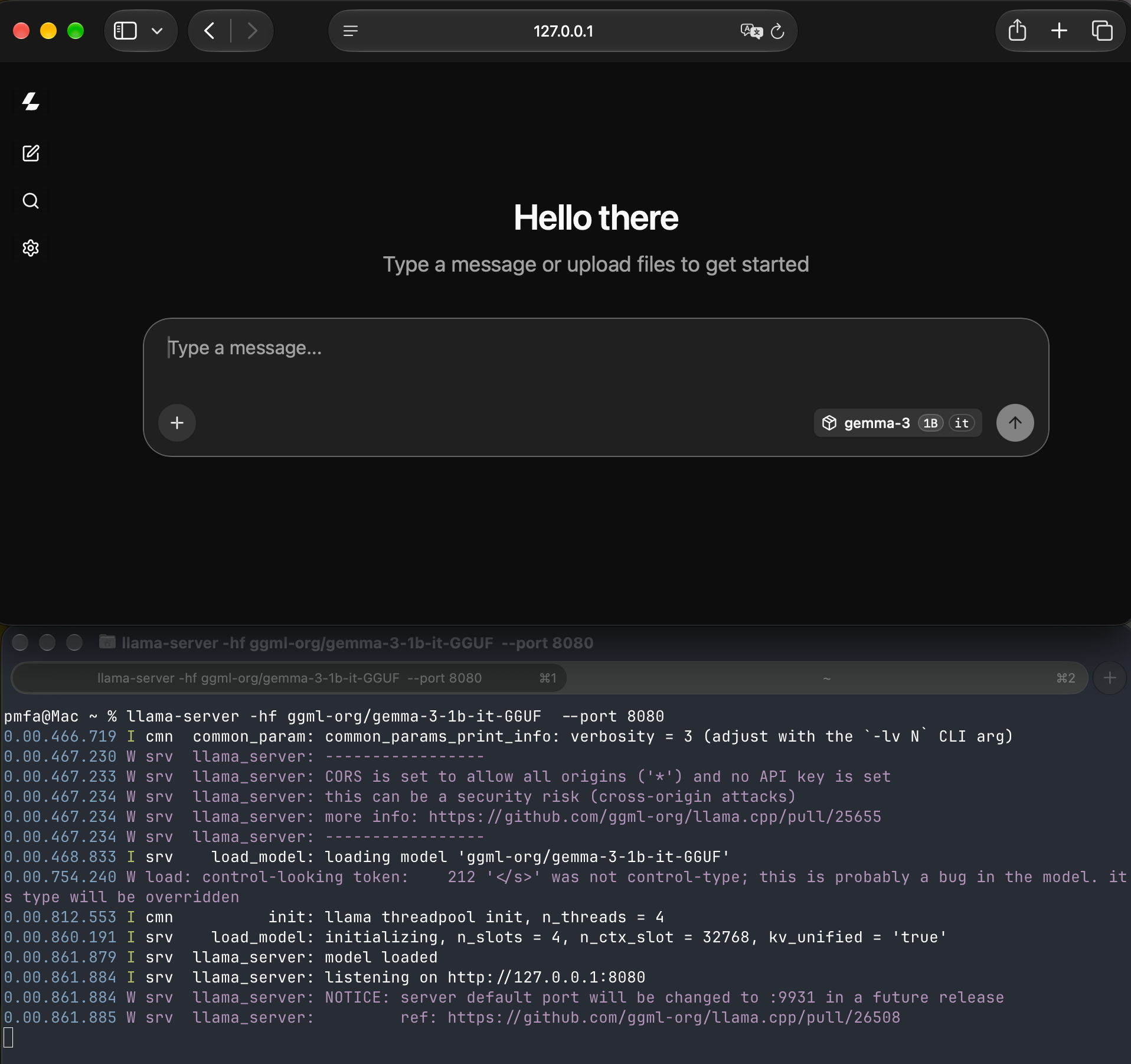
You can ask questions, upload files, and have deep conversations with the model you selected. Let’s ask something:
What use-cases can llama-ui support?
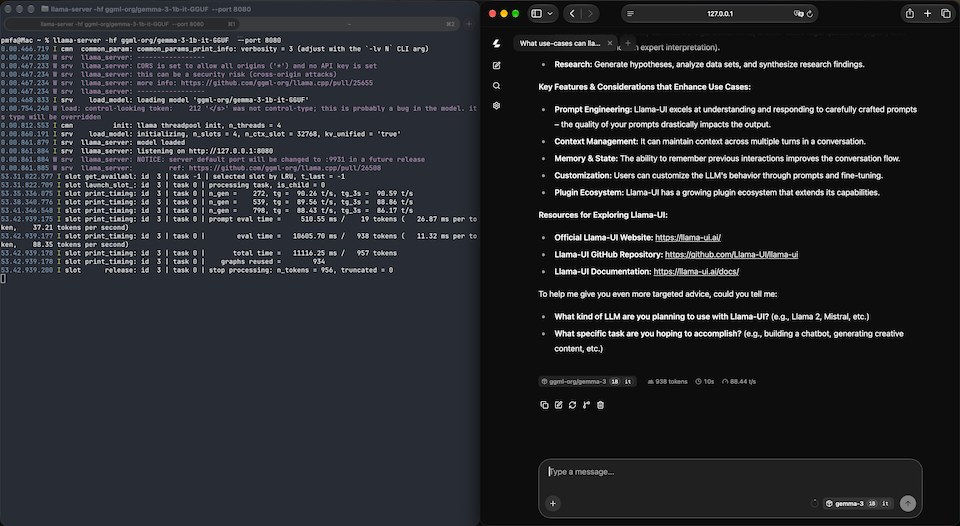
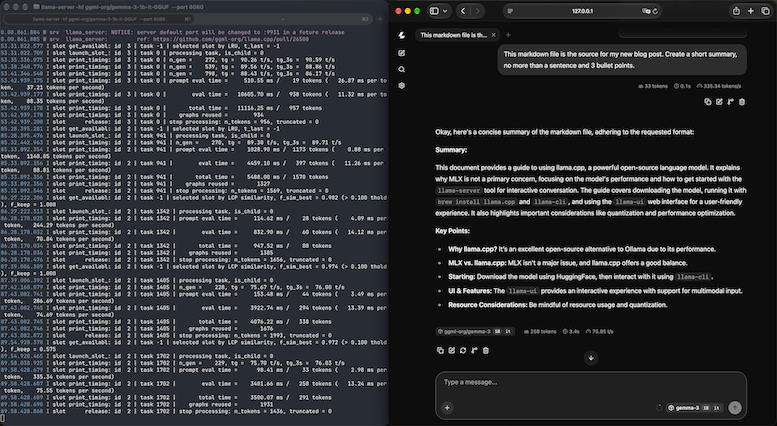
Choose models that fit within your available memory. In general, you want the GPU
to do the reasoning work. The output from ollama-server will provide
important insights into performance. Watch out for resource starvation.
You’ll probably want to learn about quantization and other performance techniques that can help you pick the right model and parameters for your use-case. Play around with different models and settings. The optimal configuration will depend on your use-case.
Picking a model from Hugging Face
Hugging Face was founded in 2016. Their first product was a chatbot aimed at teenagers. During the following AI boom, the company became widely known as it provides resources for anyone building open-source AI. In August 2026, they were acquired by Nvidia.
There are thousands of open-weight models available from their directory. An open-weight model is a system where the trained numerical parameters (weights) are publicly available to anyone to download, run locally, and fine tune.
To be able to navigate the model directory it’s necessary to understand some concepts. I’ll just touch on the most important ones.
Model Cards
Anybody can create a free user account on Hugging Face, that will enable you to:
- host a model (whether you’ve created it from scratch, fine-tuned or merged existing ones)
- provide information about your hardware and use-case so it’s easier to select a model
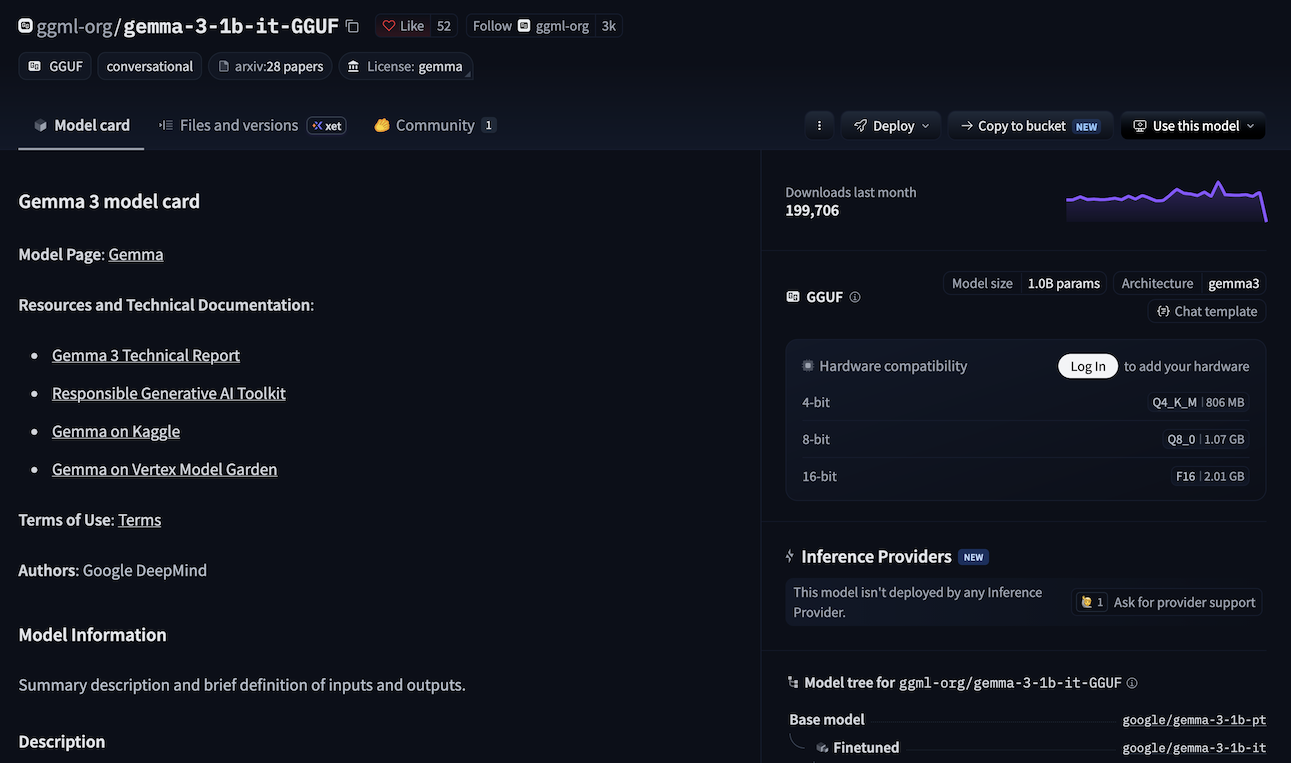
Like in other artifact repositories (i.e. Docker Hub), the name of the author
or organisation that created the model will be part of the resource identifier.
In the example above ggml-org/gemma-3-1b-it-GGUF, the organisation ggml-org
uploaded a model called gemma-3-1b-it-GGUF.
The model search UI has a couple of useful filters:
- Toggle
Base onlyto hide quantisations, fine-tunes, adapters and merges - Models with
Inference Availablecan be used as a service, running in the provider’s infrastructure
In each model’s card you will find all of the available information that you might need. Of course your mileage may vary, depending on the provider. Some models have lots of information including recommended use-cases, benchmarks, and even scientific papers. Metadata like the model’s lineage is also available. Some community provided models will have very little content, be cautious with those.
Task
You can filter models on the type of task they’ve been created to perform.
You can start simple with Text Generation or Image-to-text. Keep in mind
that some tasks require some heavy-lifting like Text-to-Image or
Text-to-Video.
If you’re trying to do something specific it’s worthwhile to dive into
into the hierarchy. For instance under Computer Vision you have
Object Detection, Depth Estimation, Image-to-3d, etc.
Language
The (human) language the model needs to understand. Unsurprisingly the most common language is English.
License
There are a lot of open-source licenses, each with their own set of quirks and requirements. Depending on the type of work you’re doing with your model, it’s a good idea to understand what’s imposed by the license. You might have restrictions on commercial use, for instance, or you might be limited on fine-tuning methods.
Model parameters
In a large language model, the parameters are the internal numerical values (weights and biases) that store the model’s understanding of the language and guide how it predicts the next word.
Typically, LLMs are trained with single or half-precision floating point numbers (float32 and float16). One float16 has 16 bits, or 2 bytes, and so one billion parameters require 2 gigabytes.
There are plenty of models that have been fine-tuned to run on specific hardware. Choose a model that fits your available memory to maximize inference speed. The largest models typically have more than 100 billion parameters, which places them outside the range of most consumer electronics.
Post-training quantization reduces parameter precision to lower memory use and improve throughput. The trade-off is quality loss, which depends on model and task.
Quantization can be further classified as static quantization if the quantization parameters are determined beforehand (typically during a calibration phase), and dynamic quantization if the quantization is applied during inference.
The simplest form of quantization simply truncates all the parameters to a given number of bits: this is applicable to static as well as dynamic quantization, but loses much precision.
Dynamic quantization allows for the use of a different quantization codebook per layer, either a lookup table of values or a linear mapping (scaling factor and bias), at the cost of foregoing the possible speed improvements from using lower-precision arithmetic.
Hyperparameters
A hyperparameter is a parameter that can be set in order to define any configurable part of a model’s learning process. The hyper suffix marks the contrast to parameters, which are characteristics that the model learns from the data.
Hyperparameters can be classified as either model hyperparameters (such as the topology and size of a neural network) or algorithm hyperparameters (such as the learning rate and the batch size of an optimizer).
Inference controls
Here are a few settings worth considering when running a model. They are the runtime sampling parameters that control how the next token will be selected:
- Temperature: Controls how creative or random the AI’s response will be. Lower values give predictable, factual answers; higher values produce more varied text.
- Top-P (Nucleus Sampling): Restricts the pool of potential next words based on a cumulative probability threshold.
- Top-K: Limits the model’s choice to a fixed number of the most likely next words.
Closing Thoughts
The post was written by me, and reviewed by AI for grammar and technical correctness. I hope it has been useful!