Adding pre-commit hooks
Git hook scripts are useful for a local pre-flight check when working on a codebase. Issues in code such as missing semicolons, trailing whitespace, and debug statements can be detected in a developer’s local clone before even submitting code for review. This makes pull requests easier to review, and allows everyone working on the project to be more productive by focusing on needed changes instead of dealing with inconsistencies in the code base.
In modern systems hooks run very fast, so the amount of hooks in your configuration shouldn’t be a limiting factor. There’s a few areas that can be covered by pre-commit hooks, I’ll go over some of them to provide a general idea:
- Automatic formatting: applying a code formatter will ensure consistent code style, and make it easier for several people to collaborate and avoid “style debates”
- Development workflow: enforcing some repo and commit guidelines will guarantee your code lineage is clear and understandable
- Static checks: linters and other static checks can catch syntax errors, missing docstrings, unused imports or identify potential bugs before the test stage
- Security: something as simple as a secret scanner can avoid a potential disaster like uploading your private keys to GitHub by mistake
This post will focus on how to install and configure pre-commit, a python framework for managing and maintaining multi-language pre-commit hooks. The list of supported hooks is big, with a lot of commonly used tools supporting the framework.
Keep in mind there are other pre-commit implementations around, for instance:
- husky is built in JavaScript and integrates very weel with JS tooling.
- prek aims to be a drop-in replacement for
pre-commitwritten in Rust.
Installing pre-commit
Before running hooks, it’s necessary to install the pre-commit package.
There’s several options for installation, depending on your project type and
preference:
Using a python package manager, like pip or pipx:
pip install pre-commit
In a python project add the following to your requirements.txt
(or requirements-dev.txt):
pre-commit
As a 0-dependency zipapp:
- locate and download the
.pyzfile from the pre-commit github project releases - run
python pre-commit-#.#.#.pyz… in place ofpre-commit ...
If you’re using devcontainer you can add it as a
feature
to your devcontainer.json:
    "features": {
      "ghcr.io/prulloac/devcontainer-features/pre-commit:1.0.3": {}
    },
Configuring pre-commit
Once you have pre-commit installed, the .pre-commit-config.yaml configuration
file lists the git hooks hooks that should run for your project. Let’s generate
a sample configuration file.
pre-commit sample-config > .pre-commit-config.yaml
The generated file will be something like this:
# See https://pre-commit.com for more information
# See https://pre-commit.com/hooks.html for more hooks
repos:
-   repo: https://github.com/pre-commit/pre-commit-hooks
    rev: v3.2.0
    hooks:
    -   id: trailing-whitespace
    -   id: end-of-file-fixer
    -   id: check-yaml
    -   id: check-added-large-files
There’s several keys and entities that are important to understand:
default_install_hook_types, the git stages where hooks will run (pre-commit,pre-push, etc), different hooks might run in different stages;repo, a repository containing one or more supported hooksrev, the revision or version of therepowe will be usinghooks, the list of hooks to be run from therepoid, a hook name present in therepostages, the list of stages where the hook defined byidwill runargs, any args forid
Once you have a configuration register with with git using:
pre-commit install --install-hooks
When you add a pre-commit hook to your project it’s a good idea to run the
hooks against all the files. Typically hooks will only run on the changed
files, but this allows you understand the current status and any improvements
currently needed.
pre-commit run --all-files
You can update your hooks to the latest version automatically by running
pre-commit autoupdate. By default, this will bring the hooks to the latest
tag on the default branch. It’s a good idea to run this regularly to get
fixes and improvements to your hooks.
Pre-commit and devcontainer work great together
I’ve added pre-commit to this blog’s tooling to have a real-world example.
So the focus is adding hooks that improve my writing workflow by
detecting potential issues as early as possible.
To seed the configuration I used pre-commit sample-config as shown above.
Then I added the feature to my devcontainer.json file, I also made sure that
pre-commit was registered in the postCreateCommand. Here are the relevant
changes to devcontainer.json:
  // Features to add to the dev container.
  // More info: https://containers.dev/features.
    "features": {
      "ghcr.io/prulloac/devcontainer-features/pre-commit:1.0.3": {}
      },

  // Run commands after the container is created.
  "postCreateCommand": "pre-commit install --install-hooks",
Now whenever I start my devcontainer the pre-commit hooks are already
installed and will run automatically when I git commit.
Configuring hooks
After ensuring my hooks were running as expected inside my devcontainer I proceeded to install a couple extra plugins that made sense for this project. Check .pre-commit-config.yaml for the configuration, the hooks are:
- codespell is designed
primarily for checking misspelled words in source code (backslash escapes are
skipped), but it can be used with other files as well. Words that should be
ignored are listed in
.codespell-ignore-words.txt - commitizen
is a powerful release management tool that helps maintain consistent and
meaningful commit messages while automating version management, beyond the
czCLI tool it’s also possible to use it on apre-commithook. - GitLeaks a fast and lightweight scanner that prevents secrets (passwords, API keys, tokens) from being committed to the repos.
- markdownlint-cli2
for Markdown linting. This linter supports Github-Flavored Markdown
and Frontmatter, so it’s perfect for this project. Note there’s several
markdownlintversions, as I’m using the Markdownlint VS Code extension I chose the most compatible implementation to ensure consistency in the output. Specific configuration is handled in.markdownlint.yaml. - yamllint a linter for YAML files, that does not only check for syntax validity, but for weirdnesses like key repetition and cosmetic problems such as lines length, trailing spaces, indentation, etc.
Check pick-a-number, also a project of mine, to get inspirations for other hooks. The configuration has a lot more hooks as the project uses python, JavaScript, and AWS CloudFormation.
Double-checking on GitHub
Git hooks are a great tool, but they’re completely optional, by design it’s not
possible to enforce their use. If for some reason it’s necessary to skip
pre-commit validations it’s as simple as using git commit --no-verify.
How to really enforce the rules outlined in the pre-commit configuration are checked? The right place to do that is the CI/CD workflow for code repository. There’s a GitHub action for pre-commit, and although it’s in maintenance-only mode, it still works like a charm.
In pre-commit.yaml
I added a workflow that runs the exact some hooks that run locally for any
pull request submmited to the main branch in GitHub. It also uses the
GitHub cache action to ensure the lengthy
step of hook installation is only done when needed.
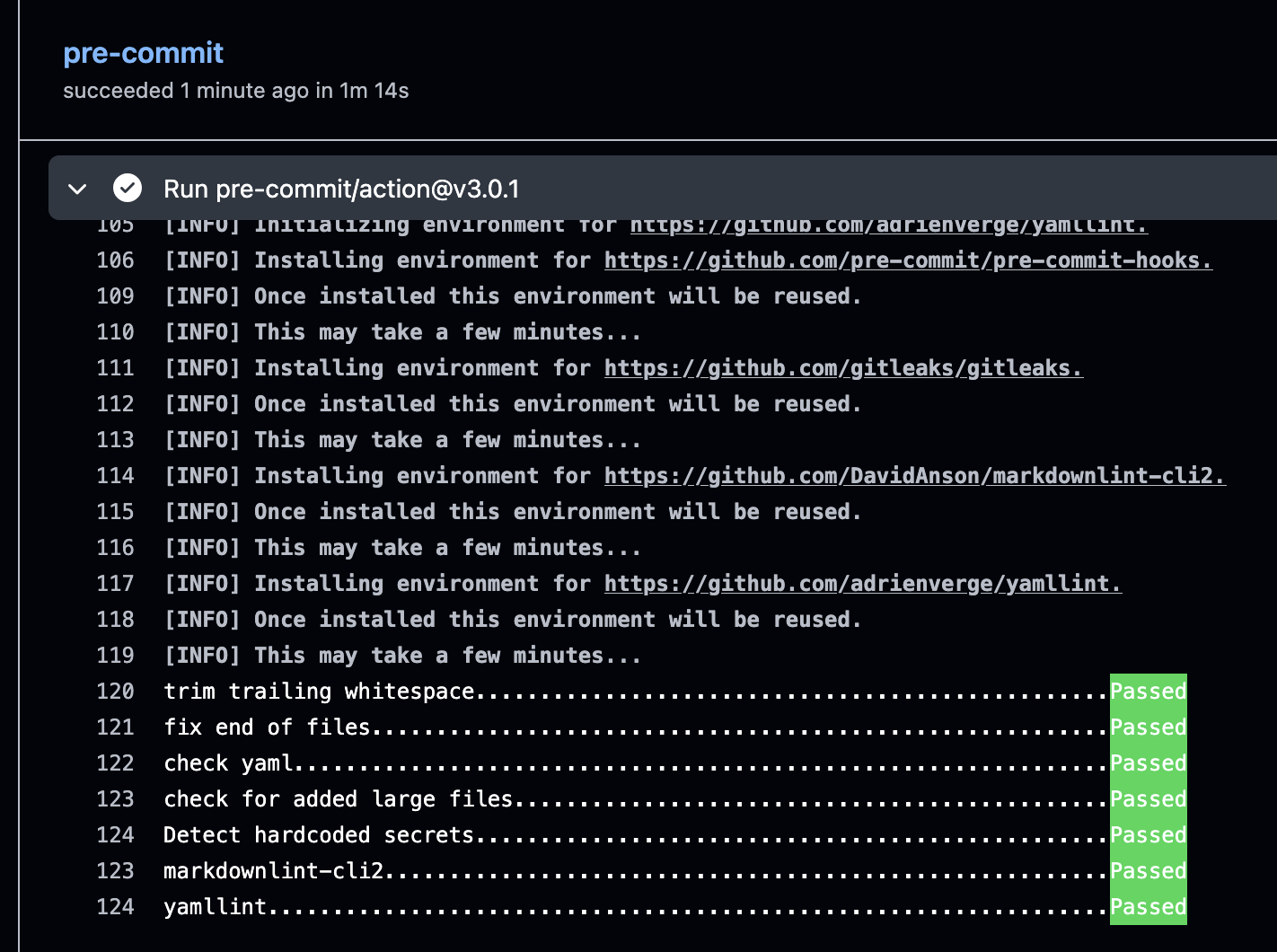
With this setup it’s possible to define and enforce CI checks centrally, at the same time developers will become aware of any issues as soon as possible.